↳
In-reply-to
»
Yeah, lol, fuck off. Tried to reproduce that hashing issue, thus playing around with Go a little bit. And what did I find?
⤋ Read More
I also set this to local years ago:
$ go env | grep TELEM
GOTELEMETRY='local'
When this came out I was also outraged. But it doesn’t go anywhere, there are no network connections. It is effectively “off” like this.
↳
In-reply-to
»
@lyse By the way, which site generator are you using? I kind of miss having code blocks with syntax highlighting and that generic yellow highlighting thing is pretty cool, too.
⤋ Read More
@movq@www.uninformativ.de It’s the “Lyse types the entire HTML by hand” generator. Yes, no kidding. I write articles so rarely, that I can do that once in a while. It’s fun to some degree, but also not.
After some time, I finally recorded some Vim macros to insert <b>…</b>, <var>…</var>, <span class=s>…</span> etc. around the tokens. This helped a little bit. But I was still questioning my mental state doing it like that. I also had to fix a bunch of the end tags by hand, because the word movement wasn’t enough or the end movement went too far. Quite the annoying process for sure.
But I think the HTML looks a wee bit nicer and is maybe even semantically a little bit better than having only <span>s everywhere. I find the <span class="whatever"> just soo awfully long. Of course, I never look at the code again, but knowing, that e.g. there is a <b> and it saves so many bytes in comparison, makes me happy. It is a more elegant solution in my opinion. Not by much, but better nonetheless. It’s a matter of simplicity. Admittedly, even I can’t avoid the <span>s alltogether. Oh well. On the other hand, I’m sure that this does not make any difference whatsoever. I bet, nobody and nothing, like a screenreader, analyzes the HTML for that, where this would be truly useful.
Oh! Maybe text browsers, though. It just occurred to me while composing this reply. :-) Haha, I lost my bet quickly. w3m picks up at least the <b> for keywords and builtin types, <u> for filenames and <i> for comments. Yey. No different styles for <var> and <mark>, unfortunately. elinks only renders the bold. It’s cool that I had the right intuition right from the beginning, despite being unable to pinpoint it. :-)
All the <span> hell with common syntax highlighters is a downer for me that keeps me from looking more into them. If I wrote more articles, I might rig something up with Pygments. At least that’s somehow positively connotated in my brain. Not sure if it actually deserves it, but I dealt with that in some loose form (can’t even remember) years and years ago. Apparently, it wasn’t too terrible.
To prepare the table of contents, I used grep and sed with some manual intervention in the end. The entire process can be improved. Absolutely.
You wrote your own site generator, didn’t you?
↳
In-reply-to
»
Hmm, so it seems this Mike is the one who inherited it: https://tilde.club/~deepend/, but not too active anywhere, though pinging “deepend” on Libera might work...
⤋ Read More
@bender@twtxt.net Sounds about right.
I had a brainfart yesterday, though. For whatever reason I thought of subdomains, which are modeled with server entries in nginx. So, each could define its own access_log location. However, there are no subdomains in place! Searching around, I didn’t find any solution to give each user their own access log file.
One way would be a cronjob, aeh, systemd timer as I learned the other day, that greps the main access log and writes all user access log files with only the relevant stuff.
↳
In-reply-to
»
@itsericwoodward @bender this is vaguely concerning...does yarn refresh feeds every minute or two? or is there some special "notify twtxt.net to refresh my feed" that i don't know about
⤋ Read More
@zvava@twtxt.net yarnd fetches the feeds roughly every ten minutes:
grep twtxt.net www/logs/twtxt.log | cut -d ' ' -f1 | tail -n 20
2025-10-04T07:00:45+02:00
2025-10-04T07:10:26+02:00
2025-10-04T07:22:43+02:00
2025-10-04T07:30:45+02:00
2025-10-04T07:40:48+02:00
2025-10-04T07:52:59+02:00
2025-10-04T08:00:07+02:00
2025-10-04T08:13:33+02:00
2025-10-04T08:23:13+02:00
2025-10-04T08:31:22+02:00
2025-10-04T08:41:29+02:00
2025-10-04T08:53:25+02:00
2025-10-04T09:03:31+02:00
2025-10-04T09:11:42+02:00
2025-10-04T09:23:11+02:00
2025-10-04T09:29:49+02:00
2025-10-04T09:36:17+02:00
2025-10-04T09:46:33+02:00
2025-10-04T09:58:40+02:00
2025-10-04T10:06:54+02:00
I suspect that the timing was just right. Or wrong, depending on how you’re looking at it. ;-)
↳
In-reply-to
»
@lyse Yeah, I’ve corrupted a Git repo or two doing that … 🥴
⤋ Read More
@movq@www.uninformativ.de Luckily, I had a grep -v git at the end, so my repo is still in working order. Phew. I wish find had grep-like --exclude-dir and --exclude options (or the include variants) instead of its own weird options that I never can remember and combine properly.
Ish: Grep-like text search with optimal alignment, built with Mojo
Associated preprint: https://www.biorxiv.org/content/10.1101/2025.06.04.657890v1
The “built with Mojo” is there because this tool exists specifically to test run Mojo as a language for bioinformatics tool development.
↳
In-reply-to
»
⤋ Read More
tar and find were written by the devil to make sysadmins even more miserable
@kat@yarn.girlonthemoon.xyz @movq@www.uninformativ.de @prologic@twtxt.net Yeah, I’m also having them in my repertoire for ages, so I’m used to the weird command line options. From today’s perspective, they’re not consistent with the rest of the typical shell utilities, that’s for sure.
Regarding find | grep foo, I recommend find -name '*foo*', prologic. Also, I regularly use -type d and -type f to find directories or files.
↳
In-reply-to
»
⤋ Read More
tar and find were written by the devil to make sysadmins even more miserable
@movq@www.uninformativ.de Yeah I actually use sift a lot these days for most “searching” – at least code and text searching. For finding files by name I still use find | grep.
↳
In-reply-to
»
My main domain name turned 24 years old today. That feels weird.
⤋ Read More
@bender@twtxt.net I’m not sure this is accurate, if you lookup mine:
$ whois shortcircuit.net.au 2>&1 | grep -i creat
created:      1986-03-05
I think this has to be the registrar’s creation date no? 🤔
What is it wrong with this command: :r ~/.bash_history | %!grep ‘err’ ⌘ Read more
This code displays the last 10 lines of a twtxt feed without a full dowload.
FEED_URL="https://twtxt.net/user/prologic/twtxt.txt"
MAX_RANGE=$(curl -sI $FEED_URL | grep -i 'content-length' | awk '{print $2}' | tr -d '\r')
MIN_RANGE=$((MAX_RANGE - 5000))

curl -s --range "$MIN_RANGE-$MAX_RANGE" "$FEED_URL" | grep -v -e '^#' -e '^$' | head -n 10
My self-response!
↳
In-reply-to
»
The other day, after a discussion online, we came to the conclusion that using awk+sed+tr could replace much of the development that requires a database. However, using SQLite to have a SQL syntax isn't a bad idea either. What do you think?
⤋ Read More
@andros@twtxt.andros.dev If something fits in a CSV file, it typically doesn’t require a database. I agree with that. Depending on the application, more complicated queries might benefit from a database, though. I don’t know awk very well, but I could imagine that grep, sed and cut reach their CSV processing limits rather quickly when you have to deal with escaped (multiline) fields.
I only very rarely have to deal with CSV files or databases in my day to day life. Maybe, these classic Unix tools offer some tricks I’m not aware of. When I have some more complicated CSV input, I generally reach for Python.
Bloody hell 🤦♂️🤦♂️
$ jq -r --arg host "gopher.mills.io" '. | select(.request.host==$host) | "\(.request.client_ip) \(.request.uri) \(.request.headers["User-Agent"])"' mills.io.log-au | while IFS=$' ' read -r ip uri ua; do asn="$(geoip -a "$ip")"; echo "$asn $ip $uri $ua"; done | grep -E '^45102.*' | sort | head
45102 47.251.70.245 /gopher.floodgap.com/0/feeds/democracynow/2015/Oct/14/0 ["Mozilla/5.0 (Macintosh; Intel Mac OS X 10_15_7) AppleWebKit/537.36 (KHTML, like Gecko) Chrome/119.0.0.0 Safari/537.36"]
45102 47.251.84.25 /gopher.floodgap.com/0/feeds/voaheadlines/2014/Mar/09/voanews.com-content-article-1867433.html ["Mozilla/5.0 (Macintosh; Intel Mac OS X 10_15_7) AppleWebKit/537.36 (KHTML, like Gecko) Chrome/120.0.0.0 Safari/537.36"]
45102 47.82.10.106 /gopher.viste.fr/1/OnlineTools/hangman.cgi%3F0692937396569A52972EB2 ["Mozilla/5.0 (Windows NT 10.0; Win64; x64) AppleWebKit/537.36 (KHTML, like Gecko) Chrome/114.0.0.0 Safari/537.36 Edg/114.0.1823.43"]
45102 47.82.10.106 /gopher.viste.fr/1/OnlineTools/hangman.cgi%3F9657307A96569A52974634 ["Mozilla/5.0 (Windows NT 10.0; Win64; x64) AppleWebKit/537.36 (KHTML, like Gecko) Chrome/114.0.0.0 Safari/537.36 Edg/114.0.1823.43"]
45102 47.82.10.106 /gopher.viste.fr/1/OnlineTools/hangman.cgi%3FB7571C7896569A529E6603 ["Mozilla/5.0 (Windows NT 10.0; Win64; x64) AppleWebKit/537.36 (KHTML, like Gecko) Chrome/114.0.0.0 Safari/537.36 Edg/114.0.1823.43"]
45102 47.82.10.106 /gopher.viste.fr/1/OnlineTools/hangman.cgi%3FB75EF81296569A529E6617 ["Mozilla/5.0 (Windows NT 10.0; Win64; x64) AppleWebKit/537.36 (KHTML, like Gecko) Chrome/114.0.0.0 Safari/537.36 Edg/114.0.1823.43"]
45102 47.82.10.106 /gopher.viste.fr/1/OnlineTools/hangman.cgi%3FC6564ADB96569A5A9E660C ["Mozilla/5.0 (Windows NT 10.0; Win64; x64) AppleWebKit/537.36 (KHTML, like Gecko) Chrome/114.0.0.0 Safari/537.36 Edg/114.0.1823.43"]
**Bloody hell 🤦♂️🤦♂️
$ jq -r --arg host "gopher.mills.io" '. | select(.request.host==$host) | "\(.request.client_ip) \(.re ...**
Bloody hell 🤦♂️🤦♂️
$ jq -r –arg host “gopher.mills.io” ‘. | select(.request.host==$host) | “(.request.client_ip) (.request.uri) (.request.headers[“User-Agent”])“’ mills.io.log-au | while IFS=$’ ‘ read -r ip uri ua; do asn=”$(geoip -a “$ip”)“; echo “$asn $ip $uri $ua”; done | grep -E ‘^45102.*’ | sort | head
45102 47.251.70.245 /gopher.floodgap.com/0/feeds/democracynow/2015/Oct/14/0 [“Mozilla/5.0 (M … ⌘ Read more
**(#cmttsmq) Ahh fuck! Sorry I was fixing a rule 🤣 This is much better!
proxy-1:~# grep -c 'Bad ASN' /var/log/caddy/caddy.log
2441
```**
Ahh fuck! Sorry I was fixing a rule 🤣 This is **much** better!
proxy-1:~# grep -c ‘Bad ASN’ /var/log/caddy/caddy.log
2441
”` ⌘ Read more
**You really cannot beat UNIX, no really. Everything else ever invented sucks in comparison 🤣
$ diff -Ndru <(restic snapshots | grep minio ...**
You really cannot beat UNIX, no really. Everything else ever invented sucks in comparison 🤣
$ diff -Ndru <(restic snapshots | grep minio | awk ‘{ print $1 }’ | sort -u) <(restic snapshots | grep minio | awk ‘{ print $1 }’ | xargs -I{} restic forget -n {} | grep -E ‘{.*}’ | sed -e ’s/{//g;s/}//g’ | sort -u) | tee | wc -l; echo $?
0
0
⌘ [Read more](https://twtxt.net/twt/34st2yq)
Had to build a list of all feeds (that I follow) and all twts in them and there are two collisions already:
$ ./stats
Saw 58263 hashes
7fqcxaa
  https://twtxt.net/user/justamoment/twtxt.txt
  https://twtxt.net/user/prologic/twtxt.txt
ntnakqa
  https://twtxt.net/user/prologic/twtxt.txt
  https://twtxt.net/user/thecanine/twtxt.txt
Namely:
$ jenny -D https://twtxt.net/user/justamoment/twtxt.txt | grep 7fqcxaa
[7fqcxaa] [2022-12-28 04:53:30+00:00] [(#pmuqoca) @prologic@twtxt.net I checked the GitHub discussion, it became a request to join forces.
Do you plan on having them join?
Also for the name, how about:
- “progit” or “prologit” (prologic official hard fork)
- “git-stance” (git instance)
- “GitTree” (Gitea inspired, maybe to related)
- “Gitomata” (git automata)
- “Git.Source”
- “Forgor” (forgit is taken so I forgor) 🤣
- “SweetGit” (as salty chat)
- “Pepper Git” (other ingredients) 😉
- “GitHeart” (core of git with a GitHub sounding name)
- “GitTaka” (With music in mind)
Ok, enough fun… Hope this helps sprout some ideas from others if nothing is to your taste.]
$ jenny -D https://twtxt.net/user/prologic/twtxt.txt/5 | grep 7fqcxaa
[7fqcxaa] [2022-02-25 21:14:45+00:00] [(#bqq6fxq) It’s handled by blue Monday]
And:
$ jenny -D https://twtxt.net/user/thecanine/twtxt.txt | grep ntnakqa
[ntnakqa] [2022-01-23 10:24:09+00:00] [(#2wh7r4q) <a href="https://txt.sour.is/external?uri=https://twtxt.net/user/prologic/twtxt.txt">@prologic<em>@twtxt.net</em></a> I know, I was just hoping it might have also gotten fixed by that change, by some kind of backend miracles. 😂]

$ jenny -D https://twtxt.net/user/prologic/twtxt.txt/1 | grep ntnakqa
[ntnakqa] [2024-02-27 05:51:50+00:00] [(#otuupfq) <a href="https://txt.sour.is/external?uri=https://twtxt.net/user/shreyan/twtxt.txt">@shreyan<em>@twtxt.net</em></a>  Ahh 👌]
↳
In-reply-to
»
@movq @falsifian @prologic Maybe I don't know what I'm talking about and You've probably already read this: Everything you need to know about the “Right to be forgotten” coming straight out of the EU's GDPR Website itself. It outlines the specific circumstances under which the right to be forgotten applies as well as reasons that trump the one's right to erasure ...etc.
⤋ Read More
@aelaraji@aelaraji.com This is one of the reasons why yarnd has a couple of settings with some sensible/sane defaults:
I could already imagine a couple of extreme cases where, somewhere, in this peaceful world one’s exercise of freedom of speech could get them in Real trouble (if not danger) if found out, it wouldn’t necessarily have to involve something to do with Law or legal authorities. So, If someone asks, and maybe fearing fearing for… let’s just say ‘Their well being’, would it heart if a pod just purged their content if it’s serving it publicly (maybe relay the info to other pods) and call it a day? It doesn’t have to be about some law/convention somewhere … 🤷 I know! Too extreme, but I’ve seen news of people who’d gone to jail or got their lives ruined for as little as a silly joke. And it doesn’t even have to be about any of this.
There are two settings:
$ ./yarnd --help 2>&1 | grep max-cache
      --max-cache-fetchers int        set maximum numnber of fetchers to use for feed cache updates (default 10)
  -I, --max-cache-items int           maximum cache items (per feed source) of cached twts in memory (default 150)
  -C, --max-cache-ttl duration        maximum cache ttl (time-to-live) of cached twts in memory (default 336h0m0s)
So yarnd pods by default are designed to only keep Twts around publicly visible on either the anonymous Frontpage or Discover View or your Timeline or the feed’s Timeline for up to 2 weeks with a maximum of 150 items, whichever get exceeded first. Any Twts over this are considered “old” and drop off the active cache.
It’s a feature that my old man @off_grid_living@twtxt.net was very strongly in support of, as was I back in the day of yarnd’s design (nothing particularly to do with Twtxt per se) that I’ve to this day stuck by – Even though there are some 😉 that have different views on this 🤣
↳
In-reply-to
»
Yeah, the lack of comments makes regular JSON not a good configuration format in my view. Also, putting all keys in quotes and the use of commas is annoying. The big upside is that's in lots of standard libraries.
⤋ Read More
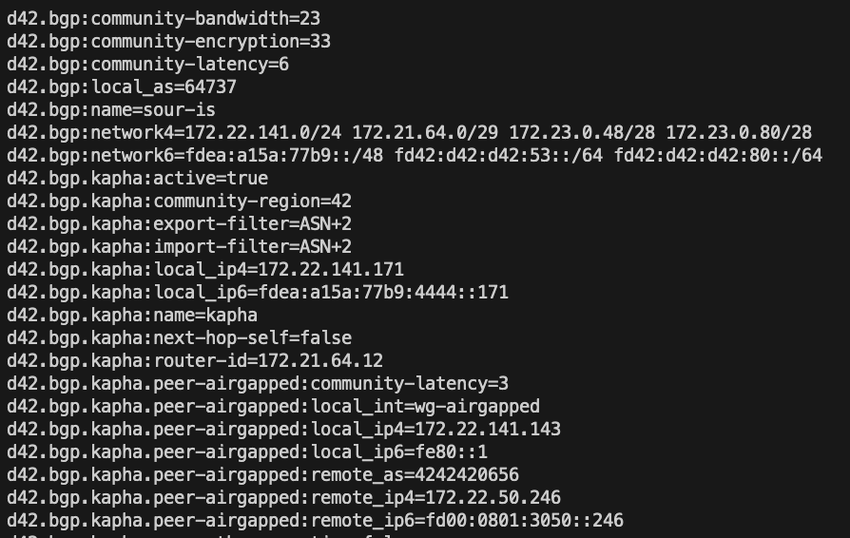
and then i have a compact version that makes things more grep’able in scripts.
↳
In-reply-to
»
Yeah, the lack of comments makes regular JSON not a good configuration format in my view. Also, putting all keys in quotes and the use of commas is annoying. The big upside is that's in lots of standard libraries.
⤋ Read More
and then i have a compact version that makes things more grep’able in scripts.
↳
In-reply-to
»
I am thinking about setting up a yarn instance. Twtxt is cool but it would be nice to be able to post from my phone.
Local posting would be a cool feature for yarn to have. A feed that can only be viewed by logged in users of that instance.
⤋ Read More
@eaplme@eapl.me
Yarn could the twtxt I want more then regular twtxt. Though I do like not having to host a yarn pod.
That client looks really cool. A web client that connects to a regular twtxt without the need to host a full yarn pod for just one user and feed.
What is the difference between twtxt-php and timeline from sorenpeter? Does it have a way to follow feeds from the web ui?
I was looking at it and what prevents someone from downloading the .config file and getting the password? Also how would I generate a totp password to use?
I should try to host that it might be the right not a full on yarn pod but also can post from my phone.
The weird thing is in my server logs it shows that your site pulled in the useragent as https://eapl.me/twtxt/?url=https%3A//neotxt.dk/user/darch/twtxt.txt with bytesypider from bytedance? That sounds weird. Plus I can’t grep just twtxt in my logs and find your feed.
Looks like now I can grep my logs without it freezing. My website is faster when hosting it myself.
I just switched to my own server for hosting my website and now I can view logs. But the logs are only one day so if I don’t view them for a day then yesterdays logs are gone. Plus if I grep the logs then it freezes but if I view it in nano it works.
How to grep Match Two Strings in One Line, or Anywhere in File or Command Output
The command line grep tool is incredibly powerful and useful for searching for matches in files, sorting text and data, finding strings in large files, and so much more. One common situation many command line users may find themselves in, is seeking to grep match for two different strings in a single line. You can … [Read More](https://osxdaily.com/2023/11/27/how-to-grep-mat … ⌘ Read more
I grepped access logs and found at least three subscribers! @apex@rawtext.club, @prologic@twtxt.net, and @darch@neotxt.dk, hi there!
#!/bin/sh

# Validate environment
if ! command -v msgbus > /dev/null; then
    printf "missing msgbus command. Use:  go install git.mills.io/prologic/msgbus/cmd/msgbus@latest"
    exit 1
fi

if ! command -v salty > /dev/null; then
    printf "missing salty command. Use:  go install go.mills.io/salty/cmd/salty@latest"
    exit 1
fi

if ! command -v salty-keygen > /dev/null; then
    printf "missing salty-keygen command. Use:  go install go.mills.io/salty/cmd/salty-keygen@latest"
    exit 1
fi

if [ -z "$SALTY_IDENTITY" ]; then
    export SALTY_IDENTITY="$HOME/.config/salty/$USER.key"
fi

get_user () {
    user=$(grep user: "$SALTY_IDENTITY" | awk '{print $3}')
    if [ -z "$user" ]; then
        user="$USER"
    fi
    echo "$user"
}

stream () {
    if [ -z "$SALTY_IDENTITY" ]; then
        echo "SALTY_IDENTITY not set"
        exit 2
    fi

    jq -r '.payload' | base64 -d | salty -i "$SALTY_IDENTITY" -d
}

lookup () {
    if [ $# -lt 1 ]; then
    printf "Usage: %s nick@domain\n" "$(basename "$0")"
    exit 1
    fi

    user="$1"
    nick="$(echo "$user" | awk -F@ '{ print $1 }')"
    domain="$(echo "$user" | awk -F@ '{ print $2 }')"

    curl -qsSL "https://$domain/.well-known/salty/${nick}.json"
}

readmsgs () {
    topic="$1"

    if [ -z "$topic" ]; then
        topic=$(get_user)
    fi

    export SALTY_IDENTITY="$HOME/.config/salty/$topic.key"
    if [ ! -f "$SALTY_IDENTITY" ]; then
        echo "identity file missing for user $topic" >&2
        exit 1
    fi

    msgbus sub "$topic" "$0"
}

sendmsg () {
    if [ $# -lt 2 ]; then
        printf "Usage: %s nick@domain.tld <message>\n" "$(basename "$0")"
        exit 0
    fi

    if [ -z "$SALTY_IDENTITY" ]; then
        echo "SALTY_IDENTITY not set"
        exit 2
    fi

    user="$1"
    message="$2"

    salty_json="$(mktemp /tmp/salty.XXXXXX)"

    lookup "$user" > "$salty_json"

    endpoint="$(jq -r '.endpoint' < "$salty_json")"
    topic="$(jq -r '.topic' < "$salty_json")"
    key="$(jq -r '.key' < "$salty_json")"

    rm "$salty_json"

    message="[$(date +%FT%TZ)] <$(get_user)> $message"

    echo "$message" \
        | salty -i "$SALTY_IDENTITY" -r "$key" \
        | msgbus -u "$endpoint" pub "$topic"
}

make_user () {
    mkdir -p "$HOME/.config/salty"

    if [ $# -lt 1 ]; then
        user=$USER
    else
        user=$1
    fi

    identity_file="$HOME/.config/salty/$user.key"

    if [ -f "$identity_file" ]; then
        printf "user key exists!"
        exit 1
    fi

    # Check for msgbus env.. probably can make it fallback to looking for a config file?
    if [ -z "$MSGBUS_URI" ]; then
        printf "missing MSGBUS_URI in environment"
        exit 1
    fi


    salty-keygen -o "$identity_file"
    echo "# user: $user" >> "$identity_file"

    pubkey=$(grep key: "$identity_file" | awk '{print $4}')

    cat <<- EOF
Create this file in your webserver well-known folder. https://hostname.tld/.well-known/salty/$user.json

{
  "endpoint": "$MSGBUS_URI",
  "topic": "$user",
  "key": "$pubkey"
}

EOF
}

# check if streaming
if [ ! -t 1 ]; then
    stream
    exit 0
fi

# Show Help
if [ $# -lt 1 ]; then
    printf "Commands: send read lookup"
    exit 0
fi


CMD=$1
shift

case $CMD in
    send)
        sendmsg "$@"
    ;;
    read)
        readmsgs "$@"
    ;;
    lookup)
        lookup "$@"
    ;;
    make-user)
        make_user "$@"
    ;;
esac
#!/bin/sh

# Validate environment
if ! command -v msgbus > /dev/null; then
    printf "missing msgbus command. Use:  go install git.mills.io/prologic/msgbus/cmd/msgbus@latest"
    exit 1
fi

if ! command -v salty > /dev/null; then
    printf "missing salty command. Use:  go install go.mills.io/salty/cmd/salty@latest"
    exit 1
fi

if ! command -v salty-keygen > /dev/null; then
    printf "missing salty-keygen command. Use:  go install go.mills.io/salty/cmd/salty-keygen@latest"
    exit 1
fi

if [ -z "$SALTY_IDENTITY" ]; then
    export SALTY_IDENTITY="$HOME/.config/salty/$USER.key"
fi

get_user () {
    user=$(grep user: "$SALTY_IDENTITY" | awk '{print $3}')
    if [ -z "$user" ]; then
        user="$USER"
    fi
    echo "$user"
}

stream () {
    if [ -z "$SALTY_IDENTITY" ]; then
        echo "SALTY_IDENTITY not set"
        exit 2
    fi

    jq -r '.payload' | base64 -d | salty -i "$SALTY_IDENTITY" -d
}

lookup () {
    if [ $# -lt 1 ]; then
    printf "Usage: %s nick@domain\n" "$(basename "$0")"
    exit 1
    fi

    user="$1"
    nick="$(echo "$user" | awk -F@ '{ print $1 }')"
    domain="$(echo "$user" | awk -F@ '{ print $2 }')"

    curl -qsSL "https://$domain/.well-known/salty/${nick}.json"
}

readmsgs () {
    topic="$1"

    if [ -z "$topic" ]; then
        topic=$(get_user)
    fi

    export SALTY_IDENTITY="$HOME/.config/salty/$topic.key"
    if [ ! -f "$SALTY_IDENTITY" ]; then
        echo "identity file missing for user $topic" >&2
        exit 1
    fi

    msgbus sub "$topic" "$0"
}

sendmsg () {
    if [ $# -lt 2 ]; then
        printf "Usage: %s nick@domain.tld <message>\n" "$(basename "$0")"
        exit 0
    fi

    if [ -z "$SALTY_IDENTITY" ]; then
        echo "SALTY_IDENTITY not set"
        exit 2
    fi

    user="$1"
    message="$2"

    salty_json="$(mktemp /tmp/salty.XXXXXX)"

    lookup "$user" > "$salty_json"

    endpoint="$(jq -r '.endpoint' < "$salty_json")"
    topic="$(jq -r '.topic' < "$salty_json")"
    key="$(jq -r '.key' < "$salty_json")"

    rm "$salty_json"

    message="[$(date +%FT%TZ)] <$(get_user)> $message"

    echo "$message" \
        | salty -i "$SALTY_IDENTITY" -r "$key" \
        | msgbus -u "$endpoint" pub "$topic"
}

make_user () {
    mkdir -p "$HOME/.config/salty"

    if [ $# -lt 1 ]; then
        user=$USER
    else
        user=$1
    fi

    identity_file="$HOME/.config/salty/$user.key"

    if [ -f "$identity_file" ]; then
        printf "user key exists!"
        exit 1
    fi

    # Check for msgbus env.. probably can make it fallback to looking for a config file?
    if [ -z "$MSGBUS_URI" ]; then
        printf "missing MSGBUS_URI in environment"
        exit 1
    fi


    salty-keygen -o "$identity_file"
    echo "# user: $user" >> "$identity_file"

    pubkey=$(grep key: "$identity_file" | awk '{print $4}')

    cat <<- EOF
Create this file in your webserver well-known folder. https://hostname.tld/.well-known/salty/$user.json

{
  "endpoint": "$MSGBUS_URI",
  "topic": "$user",
  "key": "$pubkey"
}

EOF
}

# check if streaming
if [ ! -t 1 ]; then
    stream
    exit 0
fi

# Show Help
if [ $# -lt 1 ]; then
    printf "Commands: send read lookup"
    exit 0
fi


CMD=$1
shift

case $CMD in
    send)
        sendmsg "$@"
    ;;
    read)
        readmsgs "$@"
    ;;
    lookup)
        lookup "$@"
    ;;
    make-user)
        make_user "$@"
    ;;
esac
↳
In-reply-to
»
Assuming the DNS is playing ball now, my little personal site https://www.andrewjvpowell.com/ is now self hosted and solar powered. As @mckinley can attest, running on the original nearlyfreespeech.net non-production plan could use as little as $0.01 per day so there's not really any advantage to this, its just... because I can 🙃
⤋ Read More
a simple Makefile for forwarding internet to your local machine:
SSH_HOST=https://xuu.me
PRIV_KEY=~/.ssh/id_ed25519
forward:
	LOCAL_PORT=$(HOST_PORT); sh -c "$(shell http --form POST $(SSH_HOST) pub=@$(PRIV_KEY).pub | grep ^ssh | head -1 | awk '{ print "ssh -T -p " $$4 " " $$5 " -R " $$7 " -i $(PRIV_KEY)"  }')"
↳
In-reply-to
»
Assuming the DNS is playing ball now, my little personal site https://www.andrewjvpowell.com/ is now self hosted and solar powered. As @mckinley can attest, running on the original nearlyfreespeech.net non-production plan could use as little as $0.01 per day so there's not really any advantage to this, its just... because I can 🙃
⤋ Read More
a simple Makefile for forwarding internet to your local machine:
SSH_HOST=https://xuu.me
PRIV_KEY=~/.ssh/id_ed25519
forward:
	LOCAL_PORT=$(HOST_PORT); sh -c "$(shell http --form POST $(SSH_HOST) pub=@$(PRIV_KEY).pub | grep ^ssh | head -1 | awk '{ print "ssh -T -p " $$4 " " $$5 " -R " $$7 " -i $(PRIV_KEY)"  }')"
@niplav@niplav.github.io Re: not guaranteed to see it: I wouldn’t have bothered waving hi across the Internet if I hadn’t gotten bored one day and grepped my webserver logs for twtxt users.
curl https://raw.githubusercontent.com/jointwt/we-are-twtxt/master/we-are-twtxt.txt | grep -v '^niplav ' | field 2 | xargs curl ^/dev/null | grep niplav here we go
number of GET /twtxt.txt requests against my server, grepped from my nginx access logs: https://jb55.com/s/e75071f023eeaf90.txt
for branch in git branch -r --merged | grep -v HEAD; do echo -e git show --format="%ci %cr %an" $branch | head -n 1 \t$branch; done | sort -r
After various attempts to grep for Tss and whatnot, current plan is to just try to binary-search writes to protected memory in the kernel.
tilde.club twtxt users: find /home -type d -name ‘public_html’ -exec find {} -type f \; 2>/dev/null | grep twtxt
Periodic reminder that, by using third party trackers, you are paying somebody to grep their http access log instead of greping your own. So, like, maybe roll your own analytics if you need them?
Use the x-use-gopher header on your http proxies.. “curl -sI https://codevoid.de | grep ^x-u” bitreich.org, r-36.net, taz.de are already there. #gopher
Where GREP Came From - Computerphile - YouTube https://www.youtube.com/watch?v=NTfOnGZUZDk
I changed the code of #goxtxt (my #twtxt #xmpp bot) a little bit. If all went good there should be no change in functionality but it is no more depending on #head and #grep.
a version of grep that knows about the use-mention distinction
Heartbleed vulnerability in OpenSSL
A serious security\
vulnerability has been discovered in OpenSSL. All stable
NixOS releases prior to version
13.10.35708.15a465c are vulnerable. (You can
see your current version by running nixos-version.) To
upgrade to the latest NixOS version, run nixos-rebuild
switch –upgrade. You can verify whether you are safe by
running
$ nix-store -qR /run/current-system | grep openssl
If this shows any OpenSSL ve … ⌘ Read more
Search linux bash history
Have you ever executed something on the linux shell and didn’t remember later how it was done? Well if you remember just part of it you can search for it: history | grep -i “” ⌘ Read more